6.3. Example 3 - L-band Longslit Point Source - Using the “Reduce” class API
We will reduce the GNIRS L-band longslit observation of “HD41335”, a Be-star, using the Python programmatic interface
This observation uses the 10 l/mm grating, the long-red camera, a 0.1 arcsec
slit, and is centered at 3.7  m. The dither pattern is a standard
ABBA sequence.
m. The dither pattern is a standard
ABBA sequence.
6.3.1. The dataset
If you have not already, download and unpack the tutorial’s data package. Refer to Downloading tutorial datasets for the links and simple instructions.
The dataset specific to this example is described in:
Here is a copy of the table for quick reference.
Science |
N20180114S0121-124
|
Science flats |
N20180114S0125-132
|
Telluric |
N20180114S0113-116
|
BPM |
bpm_20121101_gnirs_gnirsn_11_full_1amp.fits
|
6.3.2. Setting up
First navigate to your work directory in the unpacked data package.
cd <path>/gnirsls_tutorial/playground
The first steps are to import libraries, set up the calibration manager, and set the logger.
6.3.2.1. Configuring the interactive interface
In ~/.dragons/, add the following to the configuration file dragonsrc:
[interactive]
browser = your_preferred_browser
The [interactive] section defines your preferred browser. DRAGONS will open
the interactive tools using that browser. The allowed strings are “safari”,
“chrome”, and “firefox”.
6.3.2.2. Importing libraries
1import glob
2
3import astrodata
4import gemini_instruments
5from recipe_system.reduction.coreReduce import Reduce
6from gempy.adlibrary import dataselect
The dataselect module will be used to create file lists for the
biases, the flats, the arcs, the telluric star, and the science observations.
The Reduce class is used to set up and run the data
reduction.
6.3.2.3. Setting up the logger
We recommend using the DRAGONS logger. (See also Double messaging issue.)
7from gempy.utils import logutils
8logutils.config(file_name='gnirsls_tutorial.log')
6.3.2.4. Set up the Calibration Service
Important
Remember to set up the calibration service.
Instructions to configure and use the calibration service are found in Setting up the Calibration Service, specifically the these sections: The Configuration File and Usage from the API.
We recommend that you clean up your working directory (playground) and
start a fresh calibration database (caldb.init(wipe=True)) when you start a new
example.
6.3.3. Create file lists
The next step is to create input file lists. The module dataselect helps
with that. It uses Astrodata tags and descriptors to select the files and
store the filenames to a Python list that can then be fed to the Reduce
class. (See the Astrodata User Manual for information about Astrodata and for a list
of descriptors.)
The first list we create is a list of all the files in the playdata
directory.
 9all_files = glob.glob('../playdata/example3/*.fits')
10all_files.sort()
We will search that list for files with specific characteristics. We use
the all_files list as an input to the function
dataselect.select_data() . The function’s signature is:
select_data(inputs, tags=[], xtags=[], expression='True')
We show several usage examples below.
6.3.3.1. A list for the flats
The GNIRS flats will be stacked together. Therefore it is important to ensure that the flats in the list are compatible with each other. You can use “dataselect” to narrow down the selection as required. Here, we have only the flats that were taken with the science and we do not need extra selection criteria.
11flats = dataselect.select_data(all_files, ['FLAT'])
6.3.3.2. A list for the telluric
DRAGONS does not recognize the telluric star as such. This is because, at
Gemini, the observations are taken like science data and the GNIRS headers do not
explicitly state that the observation is a telluric standard. In most cases,
the observation_class descriptor can be used to differentiate the telluric
from the science observations, along with the rejection of the CAL tag to
reject flats and arcs.
13tellurics = dataselect.select_data(
14    all_files,
15    [],
16    ['CAL'],
17    dataselect.expr_parser('observation_class=="partnerCal"')
18)
6.3.3.3. A list for the science observations
The science observations can be selected from the observation
class, science, that is how they are differentiated from the telluric
standards which are partnerCal.
First, let’s have a look at the list of objects.
19all_science = dataselect.select_data(
20    all_files,
21    [],
22    ['CAL'],
23    dataselect.expr_parser('observation_class=="science"')
24)
25for sci in all_science:
26    ad = astrodata.open(sci)
27    print(sci, '  ', ad.object())
../playdata/example3/N20180114S0121.fits   HD41335
../playdata/example3/N20180114S0122.fits   HD41335
../playdata/example3/N20180114S0123.fits   HD41335
../playdata/example3/N20180114S0124.fits   HD41335
Here we only have one object from the same sequence. If we had multiple objects we could add the object name in the expression.
28scitarget = dataselect.select_data(
29    all_files,
30    [],
31    ['CAL'],
32    dataselect.expr_parser('observation_class=="science" and object=="HD41335"')
33)
6.3.4. Bad Pixel Mask
Starting with DRAGONS v3.1, the bad pixel masks (BPMs) are handled as calibrations. They are downloadable from the archive instead of being packaged with the software. They are automatically associated like any other calibrations. This means that the user now must download the BPMs along with the other calibrations and add the BPMs to the local calibration manager.
See Get the BPMs in Tips and Tricks to learn about the various ways to get the BPMs from the archive.
To add the static BPM included in the data package to the local calibration database:
34for bpm in dataselect.select_data(all_files, ['BPM']):
35    caldb.add_cal(bpm)
6.3.5. Master Flat Field
GNIRS longslit flat fields are normally obtained at night along with the observation sequence to match the telescope and instrument flexure.
The GNIRS longslit flatfield requires only lamp-on flats. Subtracting darks only increases the noise.
The flats will be stacked.
36reduce_flats = Reduce()
37reduce_flats.files.extend(flats)
38reduce_flats.runr()
GNIRS data are affected by a “odd-even” effect where alternate rows in the
GNIRS science array have gains that differ by approximately 10 percent.
We have added a correction in normalizeFlat that levels off the rows to
help with the fit. Here it works well, in some cases you might see a some
split when you run normalizeFlat in interactive mode. The objective,
if you see the split, is to get a fit that falls inbetween the
two sets of points, with a symmetrical residual fit.
Note that you are not required to run in interactive mode, but you might want to if flat fielding is critical to your program.
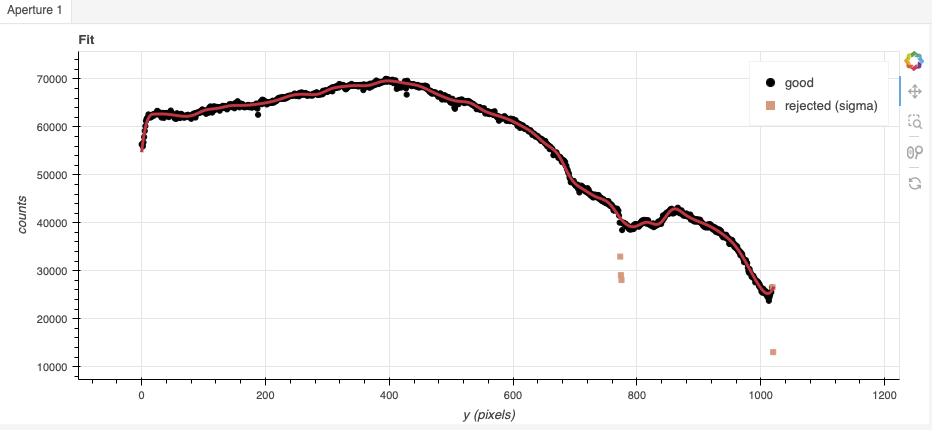
In this case, because of the rapid variations around pixel 800, increasing
the order could improve the final results. Setting order=50 fits that
area well while still offering a good fit elsewhere.
39reduce_flats = Reduce()
40reduce_flats.files.extend(flats)
41reduce_flats.uparms = dict([('interactive', True)])
42reduce_flats.runr()
6.3.6. Processed Arc - Wavelength Solution
The wavelength solution for L-band and M-band data are derived from the wavelengths of strong peaks in the emission spectrum of the sky. The quality of the wavelength solution depends on the width and strength of the telluric features.
Wavelength calibration from peaks is better done in interactive mode despite our efforts to automate the process.
TTo use the emission features in the sky spectrum, we invoke the
makeWavecalFromSkyEmission recipe.
43reduce_sky = Reduce()
44reduce_sky.files.extend(scitarget)
45reduce_sky.recipename = 'makeWavecalFromSkyEmission'
46reduce_sky.uparms = dict([('interactive', True)])
47reduce_sky.runr()
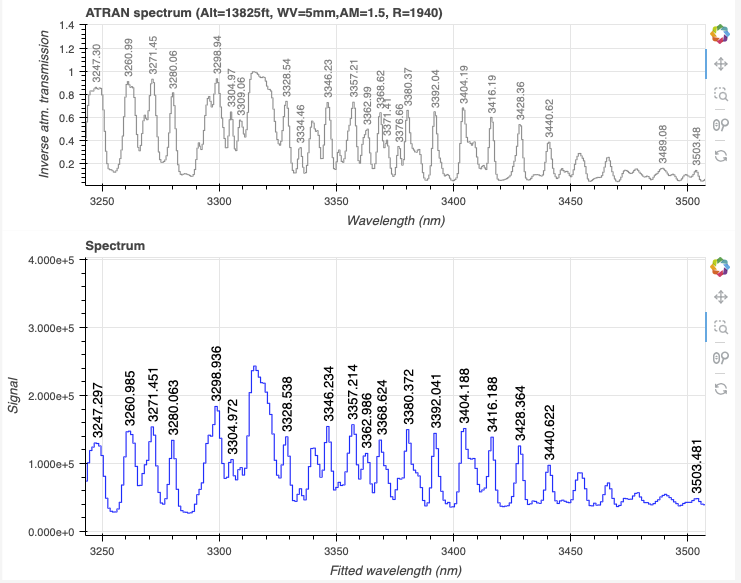
In the L-band, it is very important to inspect the feature identification. Fortunately, in our case, using the default does lead to a correct feature identification.
Zooming in:
Tip
If the feature identification were to be incorrrect, often changing the minimum SNR for peak detection to 5 and recalculating (“Reconstruct points”) will help find the good solution.
6.3.7. Telluric Standard
The telluric standard observed before the science observation is “hip 28910”. The spectral type of the star is A0V.
To properly calculate and fit a telluric model to the star, we need to know
its effective temperature. To properly scale the sensitivity function (to
use the star as a spectrophotometric standard), we need to know the star’s
magnitude. Those are inputs to the fitTelluric primitive.
The default effective temperature of 9650 K is typical of an A0V star, which is the most common spectral type used as a telluric standard. Different sources give values between 9500 K and 9750 K and, for example, Eric Mamajek’s list “A Modern Mean Dwarf Stellar Color and Effective Temperature Sequence” (https://www.pas.rochester.edu/~emamajek/EEM_dwarf_UBVIJHK_colors_Teff.txt) quotes the effective temperature of an A0V star as 9700 K. The precise value has only a small effect on the derived sensitivity and even less effect on the telluric correction, so the temperature from any reliable source can be used. Using Simbad, we find that the star has a magnitude of K=4.523, which is the closest waveband to our observation.
Note that the data are recognized by Astrodata as normal GNIRS longslit science
spectra. To calculate the telluric correction, we need to specify the telluric
recipe (reduceTelluric), otherwise the default science reduction will be
run.
48reduce_telluric = Reduce()
49reduce_telluric.files.extend(tellurics)
50reduce_telluric.recipename = 'reduceTelluric'
51reduce_telluric.uparms = dict([
52            ('fitTelluric:bbtemp', 9700),
53            ('fitTelluric:magnitude', 'K=4.523'),
54            ('fitTelluric:interactive', True),
55            ])
56reduce_telluric.runr()
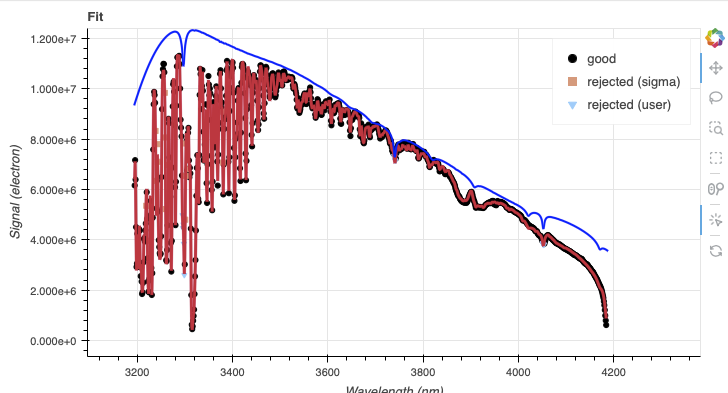
The defaults appear to work well in this case. The blue end is strongly affected by the telluric absorption. It is okay for the blue line, the expected continuum, to be above the data.
6.3.8. Science Observations
The science target is a Be star. The sequence is one ABBA dither pattern. DRAGONS will flatfield, wavelength calibrate, subtract the sky, stack the aligned spectra, extract the source, and finally remove telluric features and flux calibrate.
This is what one raw image looks like.
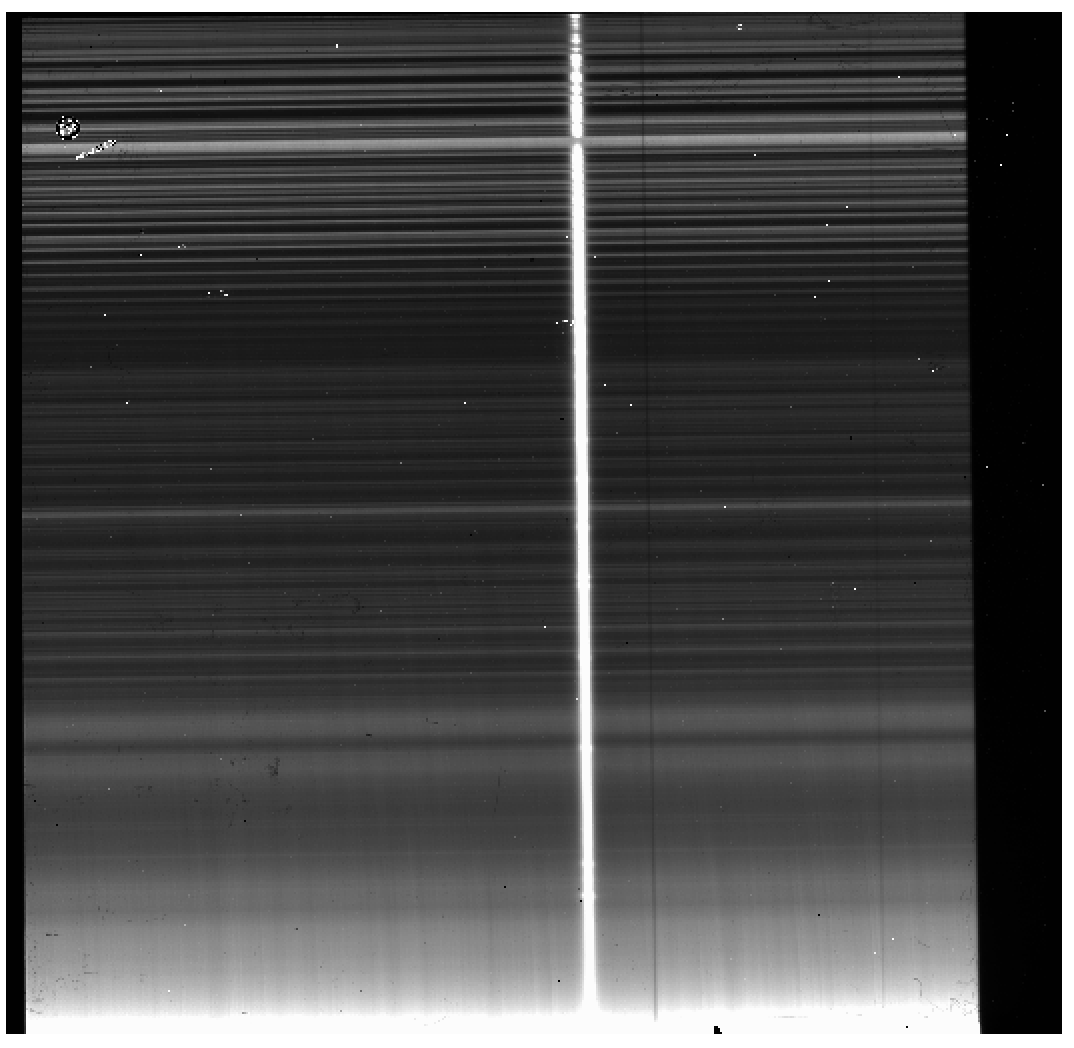
With all the calibrations in the local calibration manager, one only needs to do as follows to reduce the science observations and extract the 1-D spectrum.
57reduce_science = Reduce()
58reduce_science.files.extend(scitarget)
59reduce_science.runr()
To run the reduction with all the interactive tools activated, set the
interactive parameter to True.
60reduce_science = Reduce()
61reduce_science.files.extend(scitarget)
62reduce_science.uparms = dict([('interactive', True)])
63reduce_science.runr()
The default fits are all good, though the trace can be improved by setting
the order to 4 (interactively or by adding ('traceApertures:order', 4)
to the uparms dictionary).
The 2D spectrum before extraction looks like this, with blue wavelengths at the bottom and the red-end at the top.
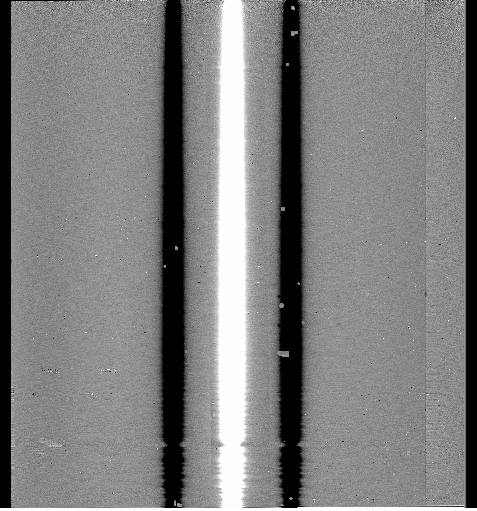
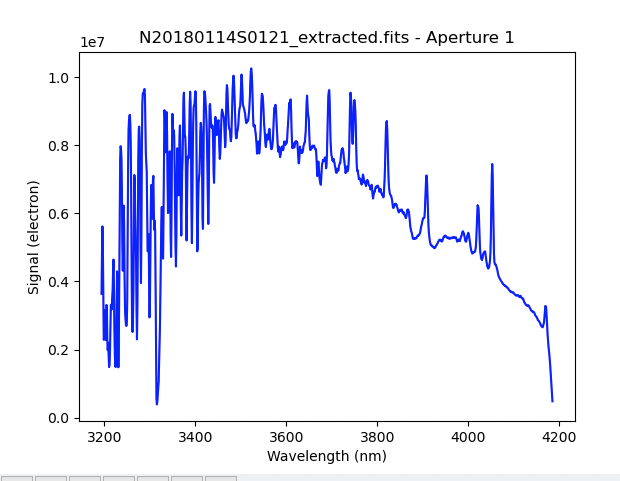
The 1D extracted spectrum before telluric correction or flux calibration,
obtained with ('extractSpectra:write_outputs', True), looks like this.
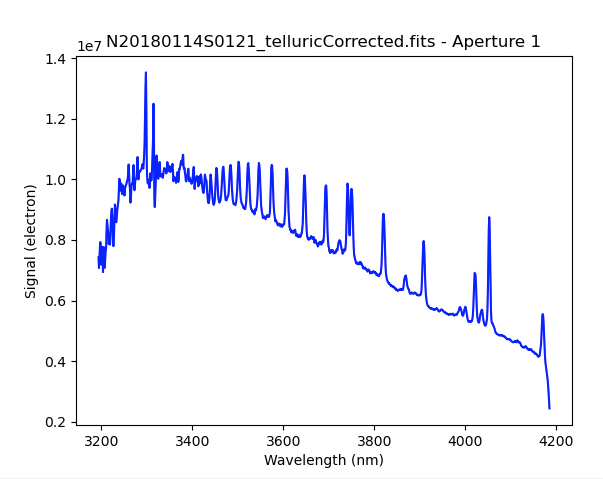
The 1D extracted spectrum after telluric correction but before flux
calibration, obtained with ('telluricCorrect:write_outputs', True), looks
like this.
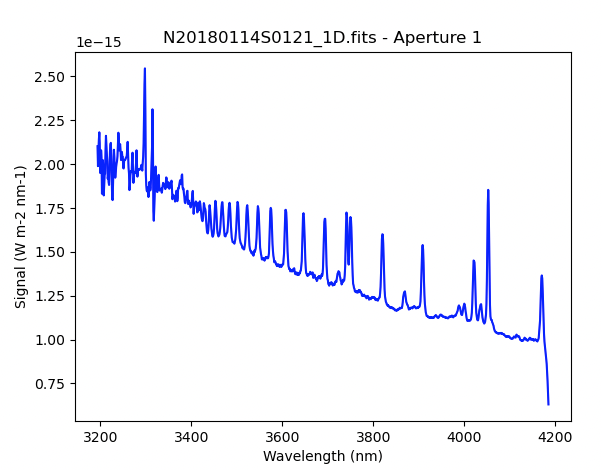
And the final spectrum, corrected for telluric features and flux calibrated.
from gempy.adlibrary import plotting
ad = astrodata.open(reduce_science.output_filenames[0])
plotting.dgsplot_matplotlib(ad, 1, kwargs={})